On this page you will find various drawing tutorials for comic artists. You can click on the images to enlarge and draw along. Share your work and this page if you find these lessons to be helpful!

Let me know what other art tutorials you would like to see covered on this site and I will make sure to add them as soon as I can!

-Rob
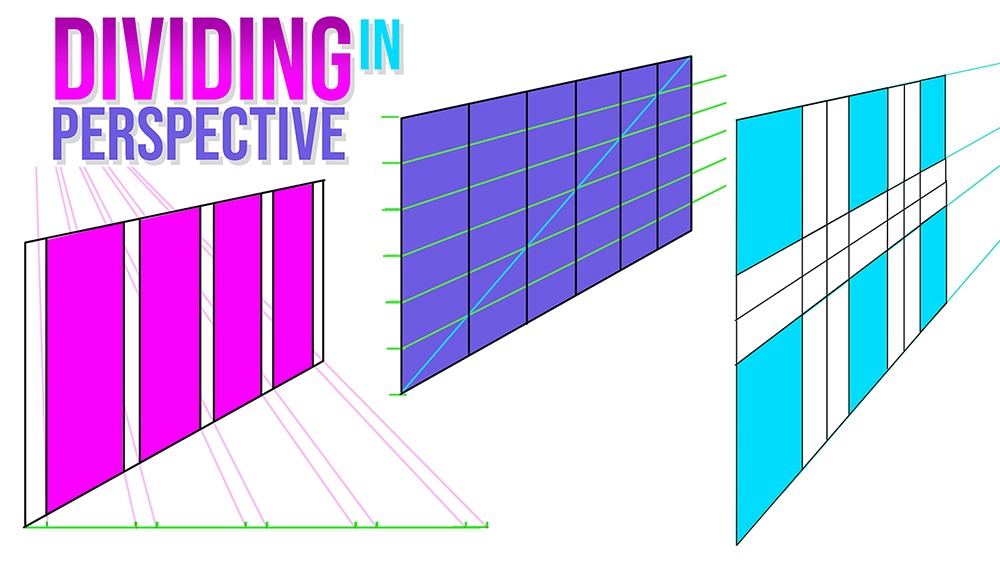
How to Divide Areas in Perspective 3 Ways
Welcome Back Fellow Artists! I have been really enjoying perspective drawing lately. It is such an amazing thing to be Read more
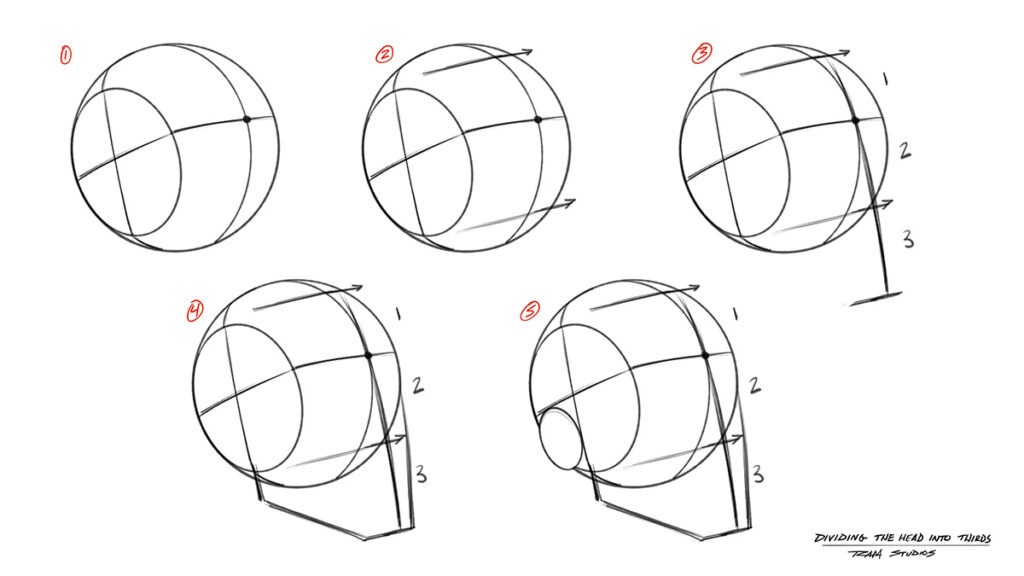
How to Draw Heads - Dividing the Face into Thirds
Welcome back fellow artists! In today's post we will delve into the exploration of drawing heads from various angles. This Read more
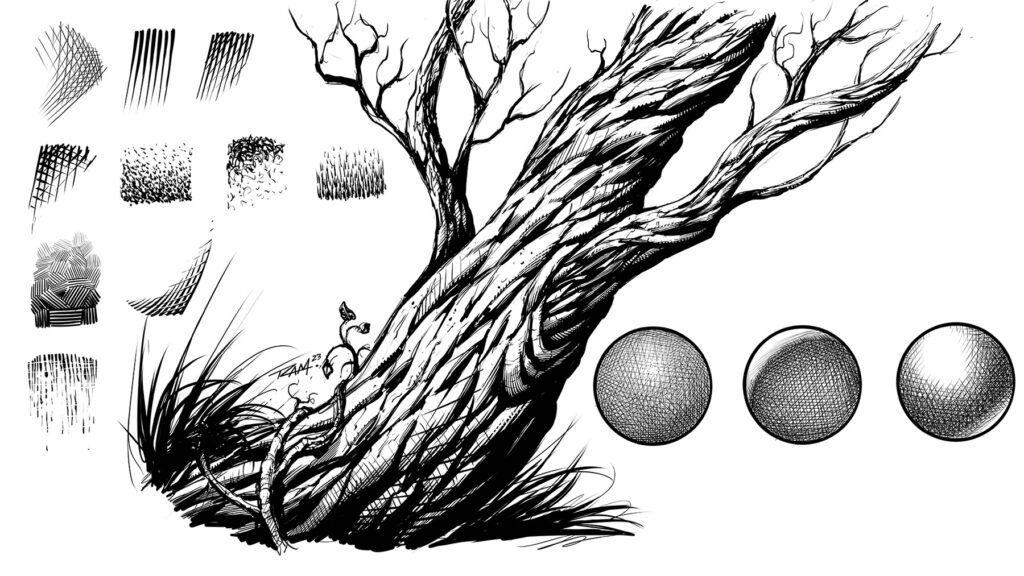
Rendering and Cross Hatching Examples
Hello Fellow Artists! I hope you are having a great day wherever you are. I will assume you are doing Read more
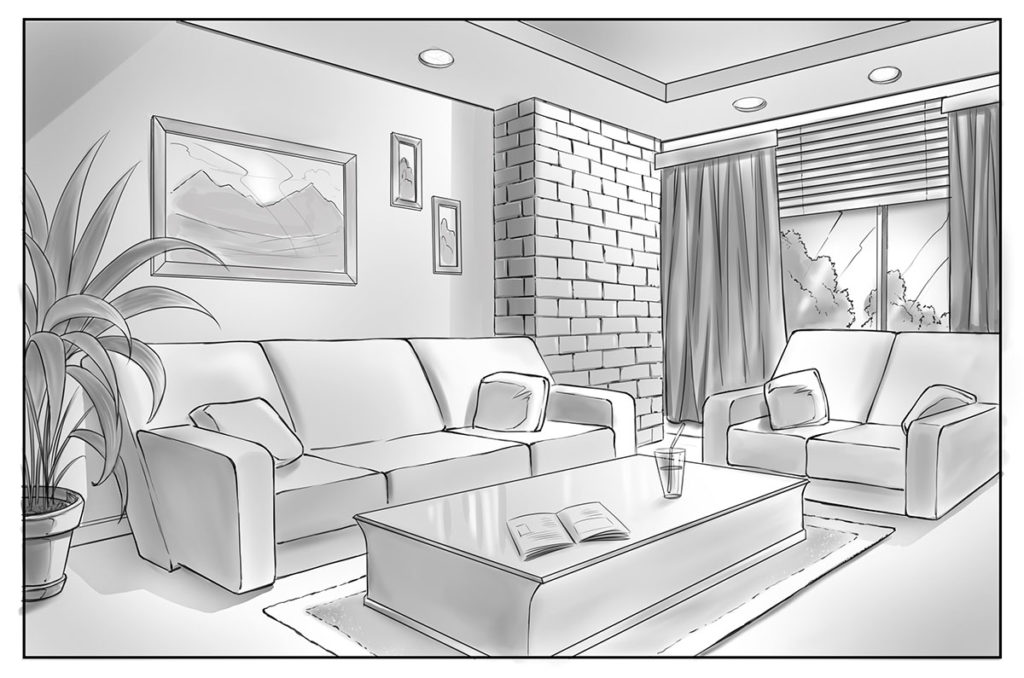
Drawing a 2 Point Perspective Background Step 8
In today’s tutorial I will show you how to draw backgrounds using basic perspective techniques. Drawing in perspective can seem Read more
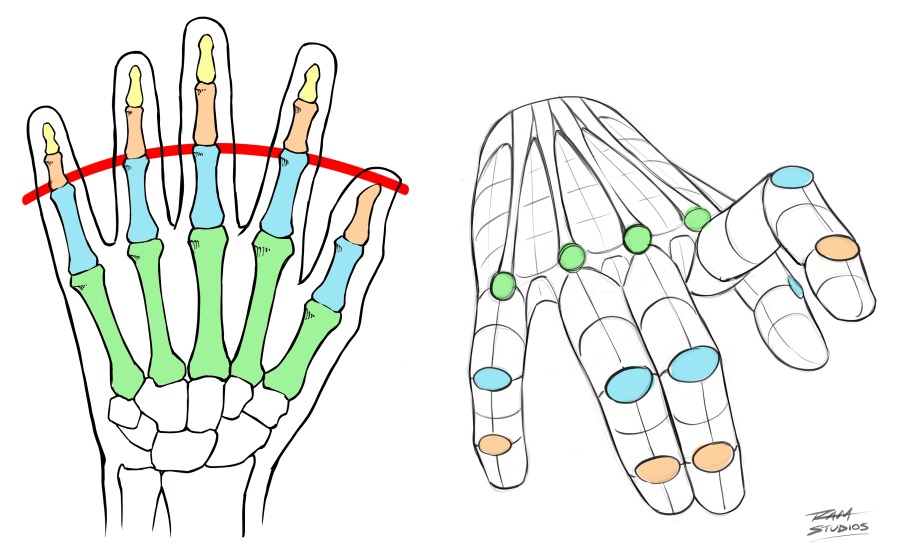
Drawing Hands Diagrams
In today's drawing tutorial you will learn how to draw hands by studying a few of the primary techniques that Read more
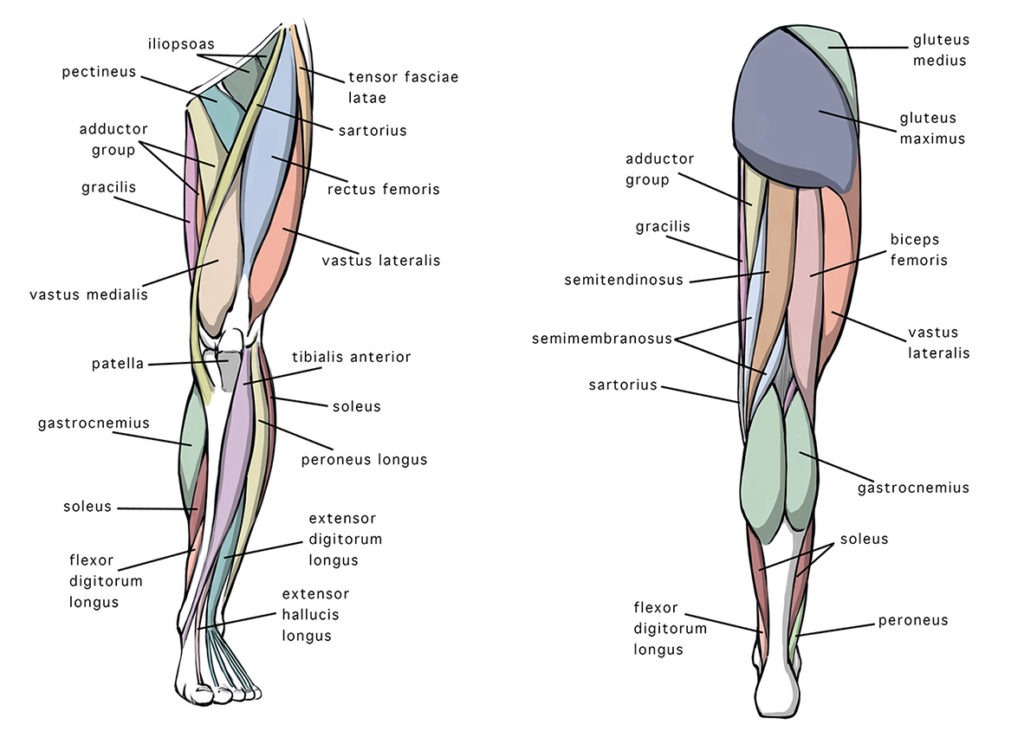
Anterior and Posterior Views of the Leg Anatomy
In today’s art post I will be sharing my 5 tips on how to draw leg anatomy along with some Read more
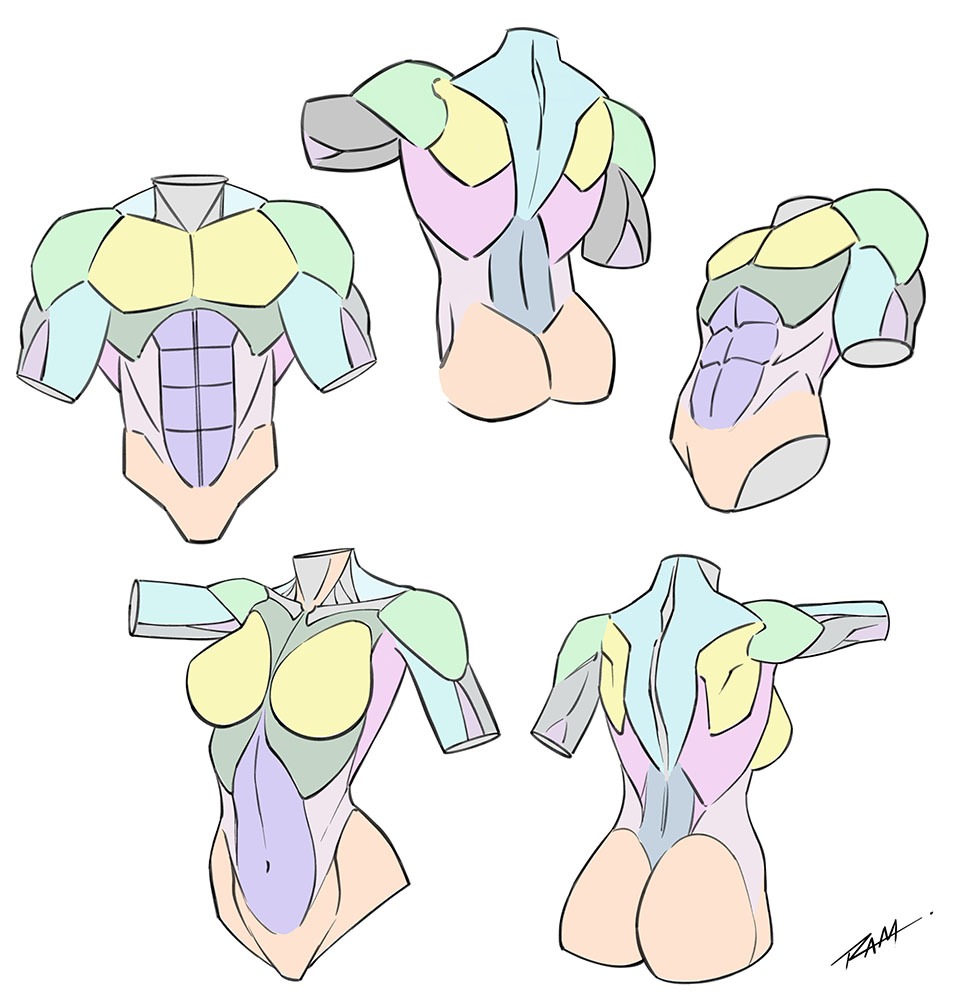
implified Anatomy Illustration by Robert A. Marzullo
Welcome back fellow artists! In today’s tutorial I want to share some techniques on simplifying and drawing the torso of Read more
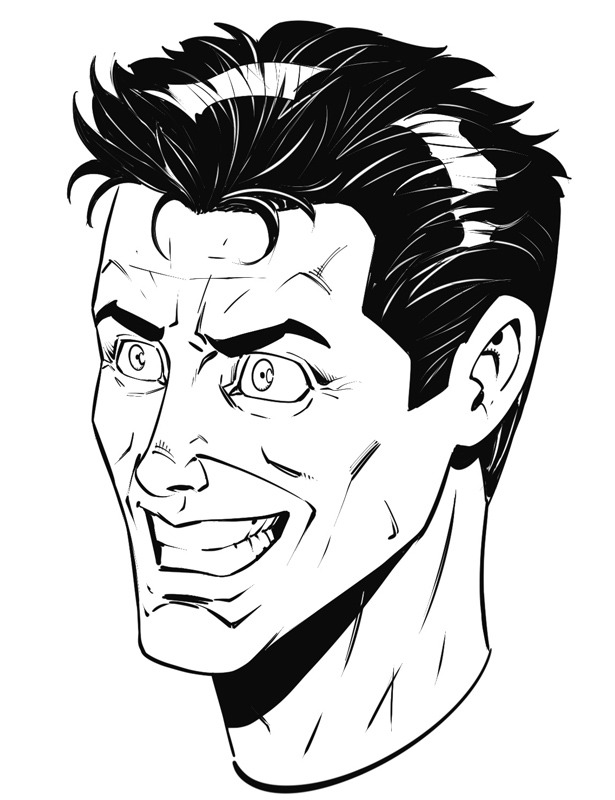
Step 8 - Final Line Work
Drawing characters that have a variety of expressions is essential to telling a good story. Nothing worse that everyone running Read more
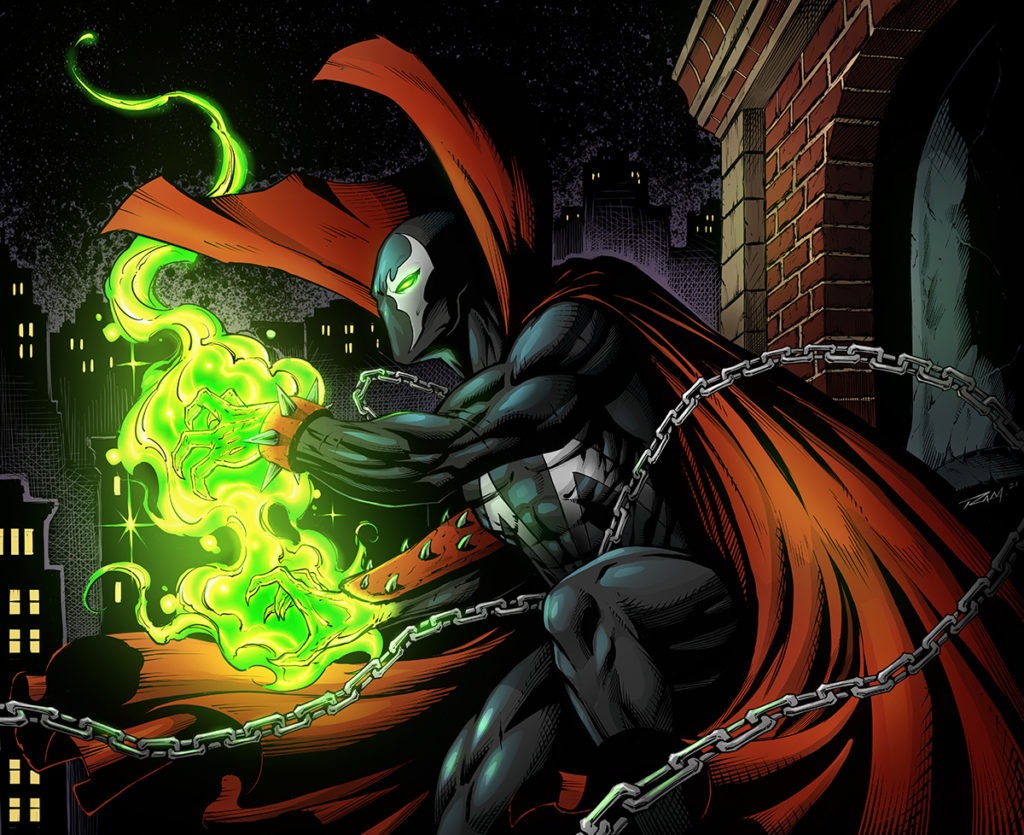
Spawn Final Version by RAM
Learn to Color Comics in the Procreate app Step by Step! Do you want to learn how to color comics Read more
Figure Drawing The Body in Action
Welcome back fellow artists! In today's post we are doing to go over the top 5 things you can do Read more

Welcome Back Fellow Artists!

I have been really enjoying perspective drawing lately. It is such an amazing thing to be able to figure out how to draw in perspective. There are so many cool tricks and techniques to learn.

So today I want to share a few of my favorites with you. Let’s dive on in and make perspective drawing easy!

First thing that I want to cover is basic dividing techniques. This allows us to properly space details like windows, columns, and trim designs.

Here is an image with a couple basic methods to practice.

Subdividing Shapes and Finding the Center Point

Perspective Drawing - Subdividing Shapes
Perspective Drawing – Subdividing Shapes

In these examples you start by drawing a flat plane. It works with a box or a rectangle. Just add diagonal lines from corner to corner to find the center point.

Then add a vertical line through the center as well as a horizontal line through the center. This now subdivides the shapes into even quadrants. This can be repeated as many times as you need and it will keep dividing the shapes up evenly as you go.

This allows us to do all sorts of neat things in perspective so give it a try. It also works in perspective as you will soon see.

Duplicating Shapes from the Center Point

In this next set of examples you will see how easy it is to duplicate shapes by using the subdivided method. Here is the next image for you to work from.

Duplicating Shapes Worksheet

Notice in this set of examples how you can use the same subdividing method to now duplicate the shape by drawing a line from the corner point of the shape through the center of the opposite side.

This works in any direction and in perspective as well. This method is great for quickly mapping out distance and making sure that each new shape is the same proportions with the one you started with.

Notice in the last part of the diagram that you can even break down smaller sections of the shape and use the same techniques to extend that part. This works in all directions but you just need to start from a different corner. Practice this over and over and it will become second nature rather quickly.

Mirroring Shapes in Perspective

In this next example we will use the same technique but in perspective.

You will start with a Horizon Line and place a point to the right on the Horizon Line. This new point will be our Vanishing Point. This is how we start a One Point Perspective.

From here you will draw lines from the Vanishing Point and this will give us a sense of Perspective. From here you will draw two vertical lines to create a flat plane.

Draw another line closer to one side. The exact point at which you draw these lines is up to you. The point is to end up with two rectangular shapes that aren’t even in width but aligned next to one another.

Mirroring Shapes in Perspective

Again, you will next to use your diagonal lines to find center to each new plane. Notice in the 4th illustration that we are now moving the angled lines to different points to create our new shapes.

The one that starts at the furthest left corner is intersecting the center at the farthest right point. This allows us to find the distance of both shapes combined and create the line furthest to the right.

Then notice that the second angled line starts on the lower left of the thinner rectangle then moves through the same center point.

This now mirrors the smaller rectangle and gives us our other line. Just like that we have mirrored the two shapes in perspective giving us 2 new rectangles that are mirrored copies of the first two but in perspective.

This method is great for all sorts of drawings. This also works in any direction. I find it very helpful for creating windows and columns but be creative and think outside the box. No pun intended!

Duplicate 3D Objects with the Same Techniques

Duplicating 3D Objects

You can see in the example above that these same techniques work with a three dimensional prism. This allows you to duplicate the object in even a 3 Point Perspective. You will still go from the lower corner point through the center to find the new points of reference.

Then the other lines are created by using the other vanishing points off the page and also referencing the lines from the original cube. You can continue this method as many times as you need. You’re on your way to drawing your very own Rubik’s cube in Perspective!

Dividing into Equal Thirds

For this next example you will learn how to divide a plane into equal one thirds. Again, this is based upon the subdividing technique with one small change.

By adding the lines you see in red we now create two new points that overlap the diagonal lines. This gives us our reference points to draw two new vertical lines. This also works in any direction.

Dividing a Shape into Equal One Thirds
Dividing a Shape into Equal Thirds

Mapping Distance in Perspective

Now to show you how to map distance and divides in Perspective. For these lessons I have created a video for you to watch. It’s far better to show you these techniques but you now understand the basic methods that help to get us there.

You can watch this video here where I show you how to divide and map distance in perspective three different ways.

If you want to learn more about basic 1, 2, and 3 Point Perspective you can check out this blog post that I created for you here –

I will be bringing you more content on drawing in perspective very soon. I also have a full 10 hour course that details many of the techniques that help us to draw amazing background in perspective. You can view that content here on Udemy – https://www.udemy.com/course/drawing-amazing-backgrounds-with-perspective-step-by-step/?referralCode=35A59D03018A265549C2

With this course you get lifetime access and all future updates are free. My next update will include how to draw archways and various window designs.

I hope you have found today’s perspective tutorial informative and more on the way. Consider joining our newsletter or stopping back to see our future updates. Reach out if you have any questions. You can use my contact form on the main page if you need to reach me.

Good luck with your perspective drawing and have an awesome day!

Robert A. Marzullo

Ram Studios Comics

Welcome back fellow artists! In today’s post we will delve into the exploration of drawing heads from various angles. This is an extremely sought after skill and it does take some time to master.

I will show you some techniques that make this complex subject a bit easier to process so that you can start drawing the characters you imagine with confidence.

I like to use a modified version of the Andrew Loomis method. I say modified because I tend to use a few more basic shapes or primitive forms as I construct the face.

I highly recommend the book, “Drawing the Human Head and Hands” by Andrew Loomis. It is my favorite book on this topic. You can get it here on Amazon ( my affiliate link ) – https://amzn.to/3LRPKIW

So let’s get started by drawing a few of the basic forms we will need to progress through this tutorial. You can use whichever drawing method you prefer. I tend to draw on either my iPad Pro or on paper with a 2H lead.

Step 1 – Drawing the Basic Form for the Cranium

How to Draw Heads - Basic Cranium Shape
How to Draw Heads – Basic Cranium Shape
  1. Start with a sphere or circle. I cleaned this one up your viewing but it doesn’t need to be this precise. Remember that perfection is the enemy of progress. I would rather see you log in more examples than spending too much time perfecting the circle!
  2. Then divide it along the horizontal and vertical axis. This will give you a bit of a globe like effect. This is also where you will pick the center of the brow line. This tells us which way our characters head is facing.
  3. You will then draw an oval on the side of the head. Picture slicing off a bit of the sphere. This gives us a sense of the plane change that occurs on the cranium.

Now take those same steps and draw them over and over again until you feel comfortable with that part of the process.

Try various examples at more and more extreme angles. This is the building block that will guide you through the rest of the process, so don’t feel the need to rush past it.

Step 2 – Dividing the Face into Thirds

How to Draw Heads - Dividing the Face into Thirds
How to Draw Heads – Dividing the Face into Thirds
  1. Take one of your previous head shapes or draw a new one with the center point of the brown line ready to go.
  2. Draw two lines from the top and bottom of the oval or side plane of the head, parallel to the horizontal brown line. This should now give you a sense of the first 2 sections the face.
  3. Take a basic measurement of those two sections and add one more for the bottom of the jaw line. This is bound to change based upon the character types you like to draw so don’t worry to much about it being exact. The main thing is that you move through the process and learn the steps for now.
  4. Now add a jaw line. This too will be very subjective to the character you are imagining. I like to use angular lines to design the shapes at this point but you don’t have to follow my every move. Just do what feels right.
  5. In the lower quadrant of the side oval you can place another oval for the ear. Now we have a very primitive head shape ready for some facial features!

I also created a Youtube video explaining this part of the process. You can watch that here –

Before we progress I want to address a common question that I get about this process. Many students will ask,

“How big do I make the oval for the side of the head?”

My answer to this is to play around with it. For the most part I would say roughly 2/3 of the height of the circle. Personally, I think that this part will effect the rest of the drawing so I like to try various sizes.

The other factor that you may consider is how far to cut into the sphere, thereby making the head wider or thinner based upon your placement. Again, I want you to experiment here so that you can develop a nice variety with your characters.

I will show you later in this post how I mix in various head shapes as I draw the structure, which I find to be a nice mixture of the techniques for my own style.

Now on to the next step!

Basic Shapes for Drawing the Facial Features

Let’s take the previous head template and break it down a bit further. Notice on the first illustration we have the segments of the face from top to bottom as the hair line, the brow line, the bottom of the nose and the bottom of the chin.

These are subject to change based upon character types. For example I am going to have a much higher line for the nose area when drawing someone like the hulk.

In this case, we will be drawing someone resembling Alfred from the Batman comics. So we will use a much taller area for the height of the nose. I am also going for a more slender head template for this character type.

Draw in Basic Facial Feature Shapes

Notice the middle illustration above when I have established some basic shapes in the light blue color. These primitive shapes help me to draw more dimensionally and keep things in perspective.

Circles for the eyes are a great way to help you draw eye lids that wrap around the eye ball area and also help with the foreshortening. Without places the spheres below the brow line, I usually skew things a bit.

For the nose you can use a larger pyramid like shape or in this case a small upside down triangle. I find this to work well by simply keeping the shape of shadow in mind. It allows me to perceive the nose from there.

Likewise with the mouth. I use a basic “M” like shape for the top lip and I tend to think of the bottom lip as a “U” like shape.

The main thing is that you pick shapes that make sense to you and simplify the subject matter. This doesn’t work for everyone so don’t force it but I must say it was a game changer for me.

Now with those primitive shapes in place, try drawing your line work around and through them. Remember that these are just guides, you need to practice seeing past them and letting your imagination run wild.

Drawing Alfred from Batman Step by Step
Drawing Alfred Step by Step

Now follow along with these next few step to draw whichever character you want. I will be drawing Alfred from Batman. He is a fun guy to draw and pretty easily recognized.

Another quick tip is to try drawing with shapes here and there. Notice that I draw the hair and mustache with a big shape and then add in the rendering.

Also, try to make any lines on the interior of the face thinner than the lines on the outside perimeter of the face. I really could have taken that much further.

Practice Drawing Your Favorite Characters with These Techniques!

Now that you know the basic steps you can follow along with a few more tutorials below. Try drawing lots of various character types and play around with the measurements like I mentioned above.

For this next one we will stick to the Batman theme and draw Bruce Wayne or Clark Kent without his glasses. They are basically the same facial type.

How to Draw Heads Step by Step – Tutorial – Bruce Wayne

Hopefully you are getting the hang of this by now but what if you are not? What else will help you master this maze of possibilities?

Practicing head shapes and the individual features of the face has helped me tremendously. They are all tricky in their own right but with lots of sketches from different angles we start to find the patterns that resonate with us.

Drawing Various Head Shapes

How to Draw Heads with Basic Shapes

In the examples above you can see some of the primary shapes at work within the character designs. There are all sorts of shapes and variations that you can introduce.

So play around with this technique and don’t be afraid to exaggerate the characters features. It is a great way to caricature and add more narrative to your character designs.

Quick Tip – Shape language also plays a role here. Use sharp angles for villains and round forms for friendly characters.

Another thing that I find helpful to do is to draw the different facial features from a variety of angles.

These individual studies can really add up over time. Plus, if you find that you do pretty well with the face drawing until you get to the nose, then drawing the nose over and over from tricky angles will more than likely get you past that problem area in your work.

Here are a few examples of how I practice noses from different angles.

Drawing Noses from Different Angles

Hopefully these techniques give you something to practice and learn from. Be patient with yourself and practice a little each day. That way you don’t give up or burn out.

Consistency is very important for the growth of an artist. Don’t feel bad if you don’t get it right away. I have been drawing for many years and I still struggle at times! Luckily for us artists, the passion to create drives us to keep going.

If you want more instruction on how to draw heads I have a full course here on my website that can view below. The first two lessons are free to watch so you can see if you like my teaching style.

How to Draw Comic Style Heads From Any Angle
How to Draw Comic Style Heads From Any Angle by Robert A. Marzullo

How to Draw Heads from Any Angle ( Full Course ) Click here!

Would you like to know when new courses are released and stay up to date with new art tutorials and resources? Then sign up for our newsletter here Click here!

Thank you very much for following my content and good luck with your art!

Robert A. Marzullo

Ram Studios Comics

I am the author/illustrator of the book, “Learn to Draw Action Heroes.” You can get a copy here – https://amzn.to/3Keku4a

Check out my Blackstone Comic here – https://robertmarzullo.gumroad.com/l/FGmzo

Hello Fellow Artists!

I hope you are having a great day wherever you are. I will assume you are doing pretty good since you are searching for ways to improve your art skills. That is always a good way to lift my spirits!

Today I want to show you some of the techniques that I use to render and shade my comic art on a daily basic. You will learn some of the basic concepts as well as work along with some step by steps to apply the knowledge.

What is cross hatching and why do we need it anyways?

Okay, maybe that is a bit too basic but let’s discuss it anyways.

Cross hatching is a way to round out the forms and/or apply texture to our illustrations.

You don’t actually have to have it but most styles tend to look much better with it. Generally if the artwork doesn’t use cross hatching or color of some kind it can look a bit flat.

Think of cross hatching or rendering as a grayscale or gradient that softens up the hard edges and forms to create more depth within the scene or subject.

A good way to start is to establish a single value by drawing lines parallel to one another. Try making some marks like these.

Practicing parallel lines

Practice drawing them at different angles to find your comfort zone. I tend to draw more consistent lines with a downward pull.

I also can only draw consistent lines over a small distance. These examples were only about 1.5” in length. The longer the lines get the more “wobbly” they get.

Keep in mind that these lines don’t need to be so parallel or consistent. It takes lots of practice to get clean lines but don’t let a perfection mindset slow you down.

Just work with the lines you can create today and keep moving forward. Besides, some wavy lines here and there are not a deal breaker.

I have spent a lot of time trying to perfect my lines and make things look clean. That can take away from the energy of the illustration real quick so be careful not to fall into that trap!

it’s really about balance and timing. There are times you will want energetic lines and times you want clean consistent lines.

Now let’s practice some cross hatching just like the pros do! Try adding some lines at a 30 to 45 degree angle. You can also try adding a 3rd set also at a slightly different angle.

Cross hatching example

You can see that with each new row of lines you get a darker value. This is the basic concept but things get a bit harder when illustrating complex scenes.

Let’s work on a background element and add some light and shadow to it. I like to practice pieces like this to build an understanding of a particular subject matter.

Follow along with these steps below and draw a chimney. You can click on any of the images within this tutorial to enlarge them.

Rendering Example – Step by Step Tutorial

Do you see how in the chimney example that the imperfections give it character? We could have been a lot more structured and used a ruler to draw this but it would have made the art feel more tense and rigid.

Practice breaking down various things you like to draw in this way and play around with the rendering styles a bit. It’s okay to be messy once and a while so that you can express more range in your illustrations.

More Rendering to Practice

Various Crosshatching and Rendering Examples to Practice

For this next drawing I wanted to give you some more things to practice. Try playing around with the cross hatching and stipple shading samples on the left of the tree.

It’s a good idea to fill up pages with these types of renderings so that you can get your muscle memory down.

Some things to try when varying up your rendering is line length, line taper, line spacing, different overlapping angles, and clean vs. messy. For the stipple shading try thicker marks that thin out as they reach the light.

For the 3 spheres on the right of the tree I am trying to show you how you might move the light source around the object. Notice that these are basic lines with very little character but we can still convey light and shadow easily enough.

The tree in the middle is to show you how you can be messy and sporadic with your rendering and still create something recognizable and organic. I have also included a video demonstrating this illustration for you to watch here –

Rendering Arm Anatomy

How to Draw and Render Arm Anatomy

For our next example I wanted to show you how to apply some crosshatching to arm anatomy. Well, at least my way of doing it!

I like to first establish the line art then apply the shapes of shadows. From there I can render from the shadows towards the light.

The same rules apply as mentioned above. Thin out the lines or the density of the cross hatching as they reach the light. Try to think of the muscles groups as spherical or cylindrical objects but watch out for creating anatomy that looks overly segmented.

Notice that I included two versions of the arm in the cross hatching stage. I did one free hand and the other I used crosshatching brushes that I made for Procreate.

I wanted to share you how the two looked by comparison. Study a variety of ways that you can render and remember that paying attention to other artists will help you learn faster.

I hope you’ve enjoyed this art tutorial and more lessons are on the way so please join my newsletter for updates as I create more.

Thank you for stopping by and good luck with your art!

Robert A. Marzullo

Ram Studios Comics

If you would like to learn more about comic style rendering. I have a full course here that you might find interesting – click here to view

How to Draw Comic Style Art - From Sketch to Rendering
How to Draw Comic Style Art – From Sketch to Rendering

Check out my digital brushes and other assets for artists here on my Gumroad – https://www.Gumroad.com/robertmarzullo

In today’s tutorial I will show you how to draw backgrounds using basic perspective techniques.

Drawing in perspective can seem confusing at first but once you know a few of the rules you can draw more freely and start to have fun with them. We will focus on 1, 2, and 3 Point Perspective in this post.  

There are others of course but most of your work will fall into these three primary versions. First off, let’s talk about the basic principles of perspective by going over the terminology.

( You can click the images to enlarge them and feel free to use them for reference. )

Basic 1 Point Perspective

One Point Perspective Diagram

This basic diagram will give you some of the ideas to understand a 1 Point Perspective drawing.

Notice the light blue line running horizontally through the canvas. The HL = Horizon Line.

This is where our eye level is within the scene. That is why we see the bottom of any objects above this line and why we see the tops of anything below this line.

The VP = Vanishing Point.  This is where all the PL = Perspective Lines converge and ultimately vanish into the distance of the horizon.

Basic 2 Point Perspective 

Two Point Perspective Diagram

In this next example you can see that much of the initial layout is the same, except now we have a second VP ( vanishing point ).  So now the same box like prisms recede away from our view in 2 directions.  

This works for more complex scenes and ideas because things are rarely parallel to our view.  Notice that everything radiates toward the VP’s except for the vertical lines going up and down.

Another thing to note here is that since the HL ( Horizon Line ) is in the approximate center of the scene, we can see the top and bottom edges of our forms but not the top or bottom plane of the forms.

If the forms were drawn completely above the horizon line we would clearly be able to see the bottom plane and the reverse is true as well.

Basic 3 Point Perspective

Three Point Perspective Diagram

Here we add another VP ( Vanishing Point ) but this time we put it up above or below to create a triangular effect.  This gives us a much more dynamic representation of the viewing angle.

Just picture yourself on a city sidewalk looking upward at a massive set of buildings.  Likewise you could be on top of the building looking down.  Each of these would be best described with a 3 Point Perspective

Quick Tip – Make sure that the 3 Points form a triangle ( Light Blue Lines ) that is outside of the PP ( Picture Plane ).  This will help you avoid any distortions in your perspective. 

Take the time to implement these three basic diagrams in your own way.  Move the horizon line around and play with different sized picture planes.  Also, experiment with a variety of compositions within the scene.

Practice Activity! Try taking some of your favorite scenes from comics, movies, games, and even from life, then draw these perspective grids through them.  You will learn a lot from that process and start to feel more comfortable with these concepts!

Here is an example of what I mean –

Perspective Drawing Reference
Practice Activity for How to Draw Backgrounds

Notice how I took from the big forms and simplified things.  This can help us to bridge the gap in those complex scenes and learn as we go. Give it a try and you’ll be glad that you did!

For this next part I will walk you through a full scene creation.  We will use all the basic concepts that you have learned so far.

Step 1 – Draw a Rough Concept

Drawing a Background Step 1
Drawing a 2 Point Perspective Background Step 1

This becomes your blueprint for the rest of the process so think loose and fast.  No refinements here, just get in any of the concepts with as few lines as possible.

You’ll have plenty of time to clean things up as you go so think more as a designer at this stage of the art.

Step 2 – Establish Your Perspective

Drawing a Background Step 2
Drawing a 2 Point Perspective Background Step 2

Now draw in your VP ( Vanishing Points ), PP ( Picture Plane ), and PL ( Perspective Lines ).  Add as many or as few PL as you will need to redraw your ideas from the previous step.

Remember, you can also be strategic in the placement of these lines, adding more where more detail will be needed and so on.

Step 3 – Draw in the Foreground Elements

Drawing a Background Step 3
Drawing a 2 Point Perspective Background Step 3

Now you can reference your rough sketch and start to draw in the elements of your scene.  Sometimes, it can be a good idea to work from big to small or from the foreground to the background.

It really depends upon the overlaps of the design and what you feel comfortable with.  Sometimes, I will draw all the walls first so I have a better idea of where to place the furniture.  Either way, just keep adding in the details from your initial concept. 

These lines will be more refined than the rough sketch but these are still not the finished product so don’t be too critical yet!

Step 4 – Adding in the Background Details

Drawing a 2 Point Perspective Background Step 4

Now add in the background details of the scene.  Same as before, cleaner lines but nothing needs to be perfect.  Remember to take breaks and come back to the work with fresh eyes.

You may just spot a bad overlap or tangent of some kind.  Look for size relationships from object to object.  It’s easy to get caught up in all the fun and miss a glaring mistake so don’t rush unless there is deadline of course!

Step 5 – Refinement of the Lines

Drawing a 2 Point Perspective Background Step 5

Now it’s time to refine the lines one more time.  I am using “Layers” so I can easily convert the previous sketch to a blue line.  If you are working traditionally that may just be a light table or transparency paper. 

Here we can be a bit more careful about our lines but still keep in mind that there no such thing as perfect and when lines are too clean they look mechanically engineered.  Save those for your alien spaceship drawings. 

These can have a little bit of an organic feel.  Generally that will add to the illustration, not hurt it.

Step 6 – Refining the Background

Drawing a Background in 2 Point Perspective Step 6

Now to clean up the background details.  Keep in mind that elements in the foreground tend to be more visible and pronounced.  So you can use a slightly heavier line on those objects.  You don’t need to hit the viewer over the head with those thick lines but it can be nice way to direct their focus and make the scene appear more dimensional. 

Step 7 – Final Line Work

Drawing a 2 Point Perspective Background Step 7

Now we can get rid of the previous layer and touch up the lines one more time.  What I generally notice is that when I get rid of my previous sketch, my lines tend to be more visibly faint. 

This is a good time to beef some of them up with a little more line weight and even erase back any mistakes.  You may even have to break out the white out.  Sorry, it’s just part of the game!

Step 8 – Adding in Value

Drawing a 2 Point Perspective Background Step 8

To finish this one off I wanted to introduce some value to the work.  Varying shades of grey can make the scene look more three dimensional and it’s fun to do. 

Just pick a light source or two and start shading.  I like to start light and slowly add to the values.  Mix in some hard edge and soft edge shadows to convey different materials and there you have it.  A scene in 2 Point Perspective all ready for your portfolio.

I hope you found this to be informative and if you want to learn more on How to Draw Backgrounds please check out my full course below –

Drawing Amazing Backgrounds with Perspective
How to Draw Backgrounds – Step by Step

You can check that out here if you like – https://www.online-courses.ramstudioscomics.com/courses/drawing-amazing-backgrounds-with-perspective-step-by-step

Here are some of my Youtube videos on How to Draw Backgrounds in Perspective. Please LIKE – SHARE – SUBSCRIBE for new content each week! – 

Thank you for viewing the content and please comment below if you have any questions or requests for new art tutorials.

I hope this post has given you some insights into how to draw backgrounds for your illustrations!

Good luck with your perspective drawing studies and more on the way soon!

Sincerely,

Robert A. Marzullo

Ram Studios Comics

Would you like to get notified of upcoming content?

Click here to sign up for the Ram Studios Comics Newsletter!

In today’s drawing tutorial you will learn how to draw hands by studying a few of the primary techniques that make this complex topic much easier to work through.

In this drawing tutorial we will cover –

  • Anatomy of the Hand
  • Proportions
  • Gesture Drawing
  • Structure and Organic Drawing

Anatomy of the Hand

Let’s first start by looking at the bone structure beneath the skin.  By studying the underlying structure of the anatomy we gain a better sense of the functionality of the hands.

This translates into our illustrations and shows a confidence and knowledge in the subject matter.

We won’t get into naming all the bones here, you can always look that up if you are interested in knowing more, but here I want to talk about the Metacarpals ( fingers ) and the alignment of the knuckles.

Drawing Hands Diagrams
Drawing Hands – Illustration by Robert A. Marzullo

Notice that the first row of Metacarpals are located in the palm area and hidden by the tissues of the hand.  ( Green Bones on the Left ) This is important to get used to thinking about since it shows why the hand is so flexible from side to side or from the thumb to the pinky.

Also, notice that the first row of knuckles are located in the palm area.  As beginner artists we tend to misplace these and then the mistake grows outward and effects more of the illustration.  A sort of bad domino like effect.

Notice the Proximal Metacarpals ( Blue Color ) are the biggest visible segment of the fingers and thumb.  Another thing to note is that the top of the Proximal Metacarpals of the fingers align to the top of the thumb. Notice the Red Curved Line.

IF you look at the illustration on the top right you can see that even in a more dynamic pose of the hand that the knuckles are great for aligning the forms. This can help immensely since the fingers have a large range of movement and we can ofter get confused while drawing them.

Proportions of the Hand

The main one that I like to pay attention to is that the middle finger is roughly the height of the palm of the hand.

This makes it much easier to check the larger proportions of the hand by comparison. Also notice that the height of the thumb is roughly the same as the height of the pinky.

It’s also good to study the angle from the middle finger knuckle down to the pinky knuckle. You can draw a curve through all the knuckles of the fingers but the middle finger knuckle is actually the apex of that curve .

Another thing to notice is how the pointer finger and ring finger are so close in length. Not exact of course but close enough to give us another way to gauge proportions as we draw the hand.

How to Draw Hands - Proportions
How to Draw Hands – Studying the Proportions

Studying Hand Poses and Gestures

It’s also good to pay attention to the relationship of the fingers.  Notice that the pinky and the thumb have a sense of alignment when brought together, where the pointer finger tends to curl over to make a similar gesture.

Hands can make so many expressive poses that you have to make time to study and sketch them as often as possible. It is good to look at your own hands and even use a mirror when drawing them.

Quick Tip! A webcam is great for hand reference because it can give us a quick snap shot at a foreshortened angle rather quickly!

When I am focused on improving my hand drawings I set up a schedule or a commitment. It might go something like this, “For the next 2 weeks I am going to draw hands for my daily warm up sketches. 10 new poses x 10 days = 100 poses.

Then I will pin them to my wall and look them over for the next few weeks. I find this to be very helpful when trying to improve any and all aspects of my artwork.

How to Draw Hands - Reference
How to Draw Hands – Reference

Gesture Drawing of the Hands are Very Important

Practicing lots of quick gesture drawings of the hands can be very beneficial.  You will start to gain a better understanding of the variety of poses the hands can make.

Make sure to keep things simple here. You want quantity over quality in this case. By logging in a lot of quick and simplified sketches of the hand you will learn much faster. You can always go back and reuse these. Then you can choose to refine them as needed.

When focusing on the gesture of the hands, make sure to throw your lines more and avoid going into details. You are looking for a sense of flow and energy. Try to use the least amount of lines as possible to explain the forms and move on to the next.

I find this to be the best exercise for improving my ability to draw hands. It also translates very well to comic art and learning to simplify more complex concepts.

Drawing Hand Gestures

Structure and Organic Drawing of the Hands

There is a time and place for all methods of drawing the hands and it is important to learn when to use them.

After you have a good idea of the various hand poses you can then explore more detailed renderings of them. Structure can help you with the more complex poses.

Think of it as a blue print for the rest of the illustrative process. With a good sense of structure and base forms it becomes much easier to draw the organic lines throughout.

In the illustrations below I developed the structured versions until I felt comfortable with the design of the hands, then I added organic lines and rendering to make the hand feel more realistic….well, in a stylized way of course!

Feel free to click on any of these images and use them for reference!

How to Draw Hands - Structure to Organic
How to Draw Hands – Structure to Organic

Here are some of my Youtube Videos on How to Draw Hands. Please LIKE – SHARE – SUBSCRIBE for new content each week!

I hope you found this content to be useful and informative. If you want to learn more on drawing comics, perspective, figure drawing, and digital painting, you can visit my online course content here –

Ram Studios Comics Art School Online

https://ram-studios-comics-art-school.teachable.com

Get my Custom Brushes and other Digital Content here on Gumroad –

http://www.gumroad.com/robertmarzullo

Want to learn my best tips for Drawing Leg Anatomy? Check out another one of my tutorials here – https://ramstudioscomics.com/index.php/2022/08/11/5-tips-on-how-to-draw-leg-anatomy-tutorial/

Thanks for stopping by and keep up the hard work! 😉

Sincerely,

Robert A. Marzullo

Ram Studios Comics

In today’s art post I will be sharing my 5 tips on how to draw leg anatomy along with some various art files to study with. If you find the tutorial to be useful please share it and also let me know which ones you want to see next. Let’s get drawing!

 1. Know Your Anatomy

First off, let’s get a basic understanding of the anatomy of the legs. You don’t have to be an expert here to draw legs well but it sure won’t hurt to know the muscle groups either.

Study these illustrations and try to memorize the shapes as well as the names of the big forms. I tend to pay more attention to the areas I am struggling with at the moment.  After you get a handle on what you are struggling with you can move on from there.

Let’s start with the basic views of the legs. Here we have the anterior view ( Front ) and the Posterior View ( Back ).

Anterior and Posterior Views of the Leg Anatomy

Now let’s take a look at the Lateral View ( Outside ) and Medial view ( Inside ).

Medial and Lateral View of the Leg Anatomy

2. Observe Rhythms and Basic Shapes

Another thing that really helps to draw legs is paying special attention to various rhythms of the anatomy.  This doesn’t just apply to a basic standing pose either, it also helps with more dynamic poses.

Let me show you some of the areas I pay attention to for drawing the legs from memory and even from life.  Keep an eye out for your own visual patterns as you observe the legs.

Notice that in the illustration below there are some memorable rhythms that make drawing the legs much easier. See the long “S” curve that goes from the top of the upper leg down to the medial side of the knee area, down to the ankle. That curve is evident in most poses of the leg and can help you to not draw the legs overly straight.

Notice that the quadriceps group together in a sort of upside down heart like shape with the medial or inner side dipping downward. That is the Vastus Medialis and it is always lower than the Vastus Lateralis.

Paying attention to the differences from one side to another is very helpful when drawing human anatomy. Often as beginners we have the bad habit of drawing everything too even from side to side or stacked.

Notice the difference from the last two leg examples on the right. See how the one with the curved arrows look much more organic and expressive even though it is drawn with basic primitive shapes.

Rhythms and Basic Forms of the Leg

3. Create Lots of Studies – Both Line and Form

To get good at drawing legs we have to spend a ton of time drawing every conceivable pose and angle we can get our eyes on. This is where being patient with your progress is such a big deal. You won’t get good over night and you won’t understand complex areas of the body with just a couple of sketches.

Try drawing specific areas of the legs at a variety of viewing angles. This can really help you to start seeing the forms in a new light. In the illustrations below I am trying to pay close attention to the knee area and how the muscles look around it.

It is also a good use of your time to create value studies. By adding light and shadow to the illustrations you get a better sense of the depth and form of the leg anatomy. Even if your goal is to be a line artist these types of studies will help you improve.

Leg and Knee Anatomy Studies by Robert A. Marzullo

4. Study the Differences from Male to Female

Obviously there are lots of variations to pay attention to when drawing the legs of different character types but to get started you must first pay attention to the noticeable differences of male to female.

Male legs are typically more rigid looking where female legs are more organic. Using more “S” curves and flowing rhythms work better to draw the female forms. Where more angular and chiseled forms look better on the male versions. Again, there is never an “always” to these concepts. Everything requires a bit of balance.

Proportions vary greatly as well from Male to Female. Notice in the illustration below that the female hips are wider than the male hips. This gives a bit of an upward curve the legs that tapers inward down to the knees.

Practice drawing male and female legs side by side and see what difference you can spot. Learning how to draw leg anatomy is also about varying up the definition as well. We first learn to draw it but then we have to soften up some of the segmentations so our characters don’t look like a walking diagram.

Male and Female Upper Leg Anatomy

5. Draw New Poses Every Day

I know this one is pretty obvious but I still have to say it. Spend time drawing legs and bodies from every angle imaginable. Draw from life, comics, movies, games, and everything that inspires you.

It won’t come easy but the reward will well worth all the hard work and dedication. Fill up those sketch books and when you can’t find the time to do fully rendered versions, don’t be afraid to simplify and/or draw smaller sketches. You will still learn a lot from those little doodles.

The main thing is to keep revisiting the subject that you need to gain a better understanding of. We tend to want to avoid the things that we don’t do well. Fight that urge and dedicate a little time each day to draw legs or whatever else you struggle with.

Before you know it, you will be drawing them from your imagination and wondering how you ever struggled with them at all.

Amazing Books to Get on Drawing Anatomy

My favorite books to reference when I want to learn more on how to draw leg anatomy and figure drawing in general are –

( Amazon Affiliate Links )

Burne Hogarth Dynamic Anatomy

I like Burne Hogarth’s book for a more stylistic approach to the work. It will also always be a favorite of mine because it was the first anatomy illustration book that I ever studied from.

George Bridgman Constructive Anatomy

George Bridgman’s books are fantastic for a sense of structure and getting used to breaking down the anatomy with simple forms in a way that makes a great deal of sense.

Superhero Poses by RAM

Check out my Full Course on Drawing Human Anatomy here –

How to Draw Dynamic Anatomy Course by Robert A. Marzullo

Click here to Visit the Course Description Page…

Here are a couple of videos on How to Draw Leg Anatomy that I have created on my Youtube channel. I hope you find them to be helpful and please subscribe for new content each week!

Welcome back fellow artists!

In today’s tutorial I want to share some techniques on simplifying and drawing the torso of the body. This area can be tricky but hopefully by the end of these lessons you will be on your way to drawing the torso or trunk of the body like a pro!

Step 1 – Understanding the Spine

Let’s first start with the spine. I know it’s a bit confusing to look at and even harder to draw but luckily we will be simplifying it for this exercise.

The Simplified Spine

Take the time to gain a basic understanding of the regions of the spine. Notice that the Thoracic bends towards the upper back and the Lumbar and Cervical areas bends toward the front of the body.

This can be very helpful when drawing the torso in a way that looks natural and organic. Notice in the illustration that we will be drawing the spine as a long cylindrical tube. We don’t need to draw all those individual vertebrae to draw the torso.

Sometimes less is more!

Step 2 – Drawing the Torso with Primitives

in this next step we will draw the upper and lower torso with very basic representations. This allows us to focus on the different angles of the upper torso to the pelvis.

These primitive forms also make it much easier to draw the body with a sense of perspective in mind.

Try drawing a variety of these poses and make sure to twist the 3 main masses ( head, upper torso, pelvis ) so that they are facing in various orientations from one another. This adds to the dynamic feeling of the pose.

Step 3 – Drawing the Organic Base Forms

For the next step we will make the torso look a touch more organic. These will still be more simplified than the end result but this will allow you to systematically make the progress you need.

You can make these shapes look how you want but I like to use a barrel shape for the chest and floating underwear for the pelvis. Credit where credit is due, I learned this method from the great Jim Lee in one of his amazing Youtube tutorials.

Just picture an action figure with the head, arms, and legs ripped off. My apologies if that sounds a bit gruesome but it does totally look like it!

Again, do your best to imagine the spine flowing through the forms. Try to twist and contort the body to make more interesting poses.

Quick Tip – Venture past drawing the illustrations that I have supplied. Find poses in life or comics that you admire and break them down in these similar methods. You will start to learn how the body moves and how to recreate it for your own illustrations.

Step 4 – Drawing the Simplified Anatomy

In this next step we will draw simple representations of the anatomy. I like to use big clean shapes here. Not only is it quicker to draw this way, it also makes it much easier to draw the body in variety of perspectives.

Simplified Anatomy Illustration by Robert A. Marzullo

Keep in mind that this is just the way I like to simplify the anatomy of the torso. You may find other shapes that relate better to your particular style.

There is not a right or wrong way to do this. Even anatomy can be subjective. Look at other artists and notice how they make different distinctions to the work.

Also, notice when studying from life that there are major proportional difference with people and their muscle definition. Some people have larger shoulders or more defined backs, etc. The same can be true for your illustrations.

Here is a video on my Youtube channel on drawing the male torso with simplified anatomy –

Step 5 – Rendering the Anatomy

In this step you can take what you have learned and refine it a bit and round out the forms. You can do this with tonal value or cross hatching. I like to also break up the line work a bit more to make the anatomy look more organic.

Poses of the Upper Torso Anatomy

Try to think of the anatomy or each muscle group as fading in and out of the area it resides in. This way you don’t trace each muscle for the final illustration. That serves a purpose for the simplified studies but not for the end result.

Quick Tip – Try drawing the torso by first starting with a bean shape. It’s an amazingly simple yet effective way to draw the torso organically.

Here is a video showing you how to use this method –

There you have it! Those are my main techniques for drawing the male and female torsos for my characters. I hope you found today’s tutorial to be helpful and please share it with your fellow artists if you don’t mind.

Figure Drawing The Body in Action

Want to Learn More? Check out my course – “Figure Drawing – The Body in Action” Click here.

Remember, be patient with yourself and keep drawing every day. You got this! 😉

Sincerely,

Robert A. Marzullo

Ram Studios Comics

Drawing characters that have a variety of expressions is essential to telling a good story. Nothing worse that everyone running around mad and scared all the time.

It’s the subtleties that make a character come to life. That sinister smirk or that rolling of the eyes when someone does something ridiculous.

Having a range of emotions for your characters makes the story much more fulfilling. Just look at how Disney movies are made. They take full advantage of every expression and emotion that they can because they know it will pull the audience in to the story.

Emotions can be expressed though the simplest of drawings!

Drawing the 6 Basic Expressions

There are lots of variations of the emotions and expressions that we can create but the 6 primary ones are anger, sadness, fear, surprise, happiness, and disgust.

Then from there we tend to blend them together to create mixed emotions and subtle expressions of each.

Notice how fear and surprise are very similar to one another. Both are a response to new information and can each trigger the fight or flight response. So the facial expression is wide open eyes to either process the oncoming danger or show excitement to the news at hand.

Let’s combine a few of these can see what we can come up with!

We can start with my one of my personal favorites, The Crazy Look! You can’t have characters like the Joker without this one.

Step 1 – Drawing the Eyes

Step 1 - Drawing a Crazy Expression
Step 1 – Drawing a Crazy Expression

For a crazy looking expression we need to combine an excited look with a bit of anger. For really crazy characters you can even mix in some happiness.

Just picture someone laughing while they have a mad look in their eyes. Yeah, super creepy and great for those villainous characters we like to draw!

So for this step draw big open eyes with downward sloping eyes brows. This allows us to combine excitement or fear along with anger as you will soon see.

Step 2 – Adding a Big Smile

Step 2 - Drawing a Crazy Expression
Step 2 – Drawing a Crazy Expression

Nothing says crazy like a big smile with clenched teeth. Opinions may vary on that one of course.

The thing I like to do is here is exaggerate the size of the smile and show as much of the teeth as possible, both on the top and bottoms.

We generally smile with either the top or bottom more predominately, that is why showing both either looks crazy or a bit silly.

For an added creepiness you can show lots of gums. Ever see the movie Aliens?

Step 3 – Eyes are Windows to the Soul

Step 3 - Drawing a Crazy Expression
Step 3 – Drawing a Crazy Expression

Make sure to draw the eyes with a bit of white on the top and bottom. This also helps to illustrate a crazy or fearful expression.

Draw in the shape of the jawline and some wrinkles that match the facial expression. Wrinkles around the smile connecting to the nose help it to read a bit better.

Quick Tip – Make sure to draw the iris as an oval on an angle like this.

Step 4 – Adding in Some Details

Step 4 - Drawing a Crazy Expression
Step 4 – Drawing a Crazy Expression

Now add in some more wrinkles and detail the face. You usually want to be careful at this stage since randomly drawing lines can age the character.

For crazy or villainous characters, I generally add more wrinkles. I think it adds to their character. So go ahead and have fun with it!

Step 5 – Crazy Hair Day

Step 5 - Drawing a Crazy Expression
Step 5 – Drawing a Crazy Expression

Most people will say that hair doesn’t have anything to do with expressions but I beg to differ. There is a reason they have crazy hair day at school.

You can get a lot of expressiveness out of a particular hair style so why not take advantage of it?

So here we draw lots of spikes and overlapping jagged shapes with a few curves at the end.

Step 6 – Inking the Lines

Step 6 - Drawing a Crazy Expression
Step 6 – Drawing a Crazy Expression

Now we can clean up the work by adding some good old digital inks!

In Procreate I add a new layer over my sketched lines, fill it with a light blue or any other color that I want, then covert the blending mode to “Screen”.

Then I add a new layer to ink on. I use a modified version of the “Tech Pen.” You can get my free Procreate brushes here If you like – https://robertmarzullo.gumroad.com/l/JYdba

Step 7 – Line Weight and Line Variation

Step 7 - Drawing a Crazy Expression
Step 7 – Drawing a Crazy Expression

This doesn’t really have much to do with how you draw a facial expression but it is still important to remember. Line weight and line variation can make your art really stand out.

Just by varying up the thickness of the lines you can not only make it look more interesting, you can direct the viewer by making certain things more pronounced.

Even small areas of shadows help to do this. Notice how the teeth stand out more with the shadows on left and right of them. This effect can be pretty useful and easy to do.

Step 8 – The Final Line Work

Step 8 - Final Line Work
Step 8 – Final Line Work

Continue on and add shadows where you need them. I like to fill in the hair when I can and erase back some highlights. It is a quick stylized way of doing dark hair that really pops off the page.

So there is our crazy expression drawn and inked in the Procreate app.

Check back soon for more step by step drawing tutorials on drawing facial expressions.

If you would like to learn more you can check out my full course here on Udemy, “How to Draw Heads from Any Angle.”

https://www.udemy.com/course/how-to-draw-heads-step-by-step-from-any-angle/?referralCode=D70FA5C0947E87109D5B

Check out more of our comic art tutorials here –

Thanks for viewing this post and more on the way. Good luck with you art!

Sincerely,

Robert A. Marzullo

Ram Studios Comics

How to Color Comics with the Procreate App

Learn to Color Comics in the Procreate app Step by Step!

Do you want to learn how to color comics with Procreate? In this example I will be using some Spawn fan art that I drew inside of Procreate. Spawn is property of the amazing artist and creator Todd McFarlane.

Here are the steps we will covering in this post

  1. Preparing the Art File to Color
  2. Laying in the Flat Colors or Flats
  3. Making Selections to Color in the Highlights
  4. Making Selections to Color in the Shadows
  5. Adding Soft Shadows with the Lock Transparency Feature
  6. Using Blending Modes for Power Effects
  7. Final Adjustments to the Colors

First, let’s cover some of the commonly asked questions about the actual art file.

What size is the original art file?

16″ Tall by 19.63″ Wide at 300dpi. I generally work at 11″ x 17″ at 300dpi or 9″ x 16″ at 300 dpi. The main thing is a balance of good resolution vs. the amount of layers you want or need.

At this particular size I was able to have a great resolution with 19 available layers. This can vary based upon your type of device and with practice you will generally use less layers.

Do I need the file to be in a specific format?

I like to work with the original non compressed file when I can. You have to be careful with Jpegs since they use compression. If the file is large enough then it generally won’t matter but keep an eye out for it just in case.

Great file formats that are lossless ( meaning they retain the image quality. ) are Tiff, PNG, and PSD. ( Keep in mind PSD can be both lossless and lossy. )

You also have options that will retain the layer data. Generally PSD is the best for this but you can also use PDF and Tiff.

What Files Can I Import in Procreate?

Procreate is very versatile. You can import PSD, Jpeg, PNG, Tiff, GIF, and obviously other .procreate files. Just remember to check your file size under the wrench icon > Canvas > Canvas Information.

You want to be aware of how many layers you may have left based upon the current document size.

Step 1 – Preparing the Art File to Color

Spawn Line Art by RAM

First I start with a flattened version of the art file at a high resolution.

This file is 16″ Tall x 19.63″ Wide at 300 dpi. Plenty of resolution and at this size I have 19 available layers to work with.

If you get a file that is merged down with the white background you can still use it. You just need to turn the blending mode to “Multiply” first.

Then add all your additional layers beneath it. You can even still color the line art on top if you need to at the end of the process!

You just have to be creative with your blending modes.

Step 2 – Laying in the Flat Colors or Flats

Here you can create layers and color in each section that you need to itemize.

Another way to do this that most comic professionals will recommend is to start with a full backdrop of color and “cut” each area out then shift the color to what you need.

I prefer to color each section with a solid brush. Then add add layers over the top as I will demonstrate here shortly.

Step 3 – Making Selections to Color in the Highlights

Now we can grab the selection tool on the top left of the screen. It looks like a little “S” to the left of the pointer icon.

The selection tool in Procreate is an amazing tool for coloring comics. You can draw nice clean selections, stop and go point to point by tapping on the screen with your Apple Pencil, then go right back to drawing the selection.

Also, you can undo and redo any part of the selection that you stop at. It is a great way to create the shapes you need for cell shading.

Notice on Spawn’s arm that I have drawn out a few shapes that sit on the top left of the anatomy. Then I take a large soft airbrush and paint in a lighter blue color.

Also notice in the image above that I have added a layer over the flat dark blue color of his suit. You want to tap that layer and set it as a “Clipping Mask.”

This allows us to paint freely over the original flat color and gives us more room for edits later. Now we can change the blending mode of that layer without impacting the underlying color.

Notice if you click on the image above you can see a small arrow on the layer labeled “Highlights”. This arrow shows you that it is a clipping mask of the layer below. You can add as many of these in succession as you need to.

Step 4 – Making Selections to Color in the Shadows

Now we basically repeat the same process for the shadows. Using the selection tool to isolate the shapes of shadows.

We can even freely paint larger shadows without a selection. How do you ask? The clipping mask is making that a breeze. It references the larger base flat color and automatically keeps that paint into that shape as if it was already selected. Pretty neat right?!

You can also change the combine mode to the layer for some neat effects. Always remember you can control the blending modes on the brush and layer level.

Step 5 – Adding Soft Shadows with the Lock Transparency Feature

Another cool feature in the Procreate app is the “Lock Transparency” feature. By doing a two finger swipe on the layer you can see a tiny checkered pattern behind the thumbnail of your art.

This means that the edges of the art are basically locked and no paint will go out of the perimeter of this shape. This can be a good way to conserve layers if you feel more confident about the effect you are getting ready to apply.

Notice in the image above that I have applied shadows with a large soft airbrush over the cape and the white areas of his suit. With each of those areas locked I can brush across them freely and apply the paint without a selection.

I can still chose to add a clipping mask over the top if I need it but again, this can be a great way to cut down on the use of layers. We only have 19 to use in this example and I have already used 13.

Just keep in mind that if you are happy with a certain part of your illustration and running low on layers you can merge those clipping masks down to the base flat layer.

Step 6 – Using Blending Modes for Power Effects

Now for some special effects! I love drawing powered superheroes since it is so much fun to visuals that appear magical and out of this world!

Procreate has some exceptional brushes for just that. If you go to the brushes library and scroll down to “Luminance”, you will see brushes that already have the blending mode set to “Add”.

This along with a few other settings will give you an immediate power effect. I like to start with a slightly darker tone, then pick one of these brushes with a brighter tone.

You don’t have to go too light because the blending mode will keep intensifying with each pass. For instance, if I keep applying yellow to lime green I will eventually get a white hot spot in the middle of the stroke. Great for energy effects but try not to over do it!

Notice I also added a layer over the line art. This is so that I can push back some of those vivid black lines and so that I can create a soft glow around the power effect.

Step 7 – Finishing Touches and Final Adjustments

Spawn Final Version by RAM

Now we repeat the previous steps on all the other areas of the illustration. For areas like the brick wall I use a very basic approach. A large soft airbrush to shadow the bottom and side while creating a small spherical highlight on the front surface.

Notice I also select the side planes of the wall and shade them down. It is helpful to try and think of all the different plane changes when applying light and shadow.

Once I have colored all the areas in, I can select the base flats and make some final adjustments. I thought Spawn’s suit was a bit too blue so I selected that layer and went to Adjustments > Hue, Saturation, Brightness and pulled the Saturation slider to the left as well as the Brightness slider.

Making the layer less bright and less saturated. This allowed me to quickly drop the blue out without negatively impacting the other layers or clipping masks.

Another final touchup that I like to do is to do a 3 finger swipe down > Copy All > Paste. This will take a copy of all the visible layers and put them together on one while leaving the others intact.

Then I create a copy of the flattened layer. Now I can drop the saturation over the entire layer but since I have the saturated version below I can use a large airbrush to soft erase and blend the two together.

I like to have certain areas more saturated with bright colors like the power and parts of the cape.

Then we can export the file by going to the wrench icon > Share > then select the file type you want. Procreate has lots of file types to choose from but I typically either used PSD’s or Jpegs.

Final Suggestions

It’s always a good idea to check your work on different screens just in case your colors are off.

Remember, Procreate captures a time lapse video of every artwork you create! Playback your videos and see what decisions you made. Sometimes those videos can really tell us where we went wrong or what we need to improve upon.

Go to Canvas>Canvas Information>Statistics to see how long the artwork took you to create. This can be a great way to gauge what type of art you can manage on a deadline!

Conclusion

Procreate is an amazing app and the iPad Pro and Apple Pencil is still one of my favorite ways to create comic art. In fact, I do most of my work on it these days.

Don’t worry if you like traditional art you can always use the strengths of this app in conjunction with your traditional work. I will be making more videos and blog posts on that very soon!

Procreate has lots of great features as I mentioned above and more on the way as they constantly release new updates. At the time of this post they are at version 5.3

They have even added the ability to import 3D models and paint on them. I have been using that feature to create and use models for drawing reference.

What apps and programs do you use and why? Comment below and if you like the content please share it with your fellow artists.

Here is a in depth video explaining how I use Procreate to color comic book fan art.

Get my Comic Art Inking set for Procreate here

https://robertmarzullo.gumroad.com/l/JYdba

Thanks for reading and more on the way soon!

-Robert

How to Color Comics in Procreate

Want to learn more? I have a full course on Coloring Comic Art in Procreate here Click here!

Welcome back fellow artists!

In today’s post we are doing to go over the top 5 things you can do to improve your figure drawings fast. Let’s get started!

Step 1 – Draw Lots of Gestures to Warm up Each Day!

5 Minute Gesture Drawings

Gesture drawing is pretty much the secret sauce to figure drawing. You can’t have a great figure that lacks gesture. It will come off as looking stiff and lifeless.

Also, when you take the time to warm up with 3-5 minutes sketches of a variety of poses your imagination becomes charged. The magic truly happens with the rough sketch and the rough sketch needs a good sense of gesture.

Think of it like the blue print that will guide you through the rest of the illustration. Don’t rush past it or your end result will suffer! Also, don’t think they need need to look clean and polished. That isn’t the point. Generally when we clean things up and over render we lose some of the energy anyways.

Here are some tips for great gestures. Study from life but don’t get caught up in the details. Grab the main aspects of energy and flow through the body. Use quick sweeping curves. Simplify as much as possible. Less is more at this stage.

Focus on the curve of the spine. Try to start with one main line through the entire pose, then add to it. This is know as the “Action Line.” Not every line and form will adhere to it but it can help you to reduce the entire body to its most basic sense of movement. Then add the other forms from there but keep them simple and gestural.

Step 2 – Simplify with Primitive Forms

Drawing the Figure with Primitive Forms

Drawing the human form can be a complex task so we need to simply the process sometimes. You ever try drawing a body in perspective. It can be tough to envision where everything goes.

We have to remember and orchestrate a lot of things at once. A technique that helps with part of this process is drawing they figure with primitive forms also known as “Stereometric Drawing.”

This can help with perspective, proportions, placement of the anatomy, and consistency with our figures. By simplifying the human body with prisms we can give ourselves some guidelines to place all those glorious details upon.

This isn’t a technique that I tend to use for every figure drawing but there are certain camera angles and foreshortened shots that make me quickly remember how important this method can be.

Tip #3 – Study Proportions!!!

Figure Drawing Proportions by Robert A. Marzullo

Proportions can be highly subjective since we come in all different shapes and sizes. Still, it helps to have some guidelines to follow to spot errors in the work and have some consistency in your figure drawings.

Notice in the illustration above that I am marking parts of the figure by using the head as a tool of measurement. This allows me to see that my first attempt at the female form was a bit too short in the upper torso area. The second example puts the lower pelvis at approximately the half way point from head to toe.

There have been lots of various ways of measuring the human figure over the years. Some have even used the middle finger as a unit of measurement. For instance for the male figure, the 8 heads tall model works really well. 2 heads down from the top is the nipple. 3 heads down is the navel. 4 heads down is the bottom of the pelvis and so on. Oh yeah, and did you know that most of us have the same wing span from finger tip to finger tip as our own height?

Some of these forms of measurement are easier to remember that you might think. Andrew Loomis has some great methods in his book, “Figure Drawing – For All it’s Worth.” ( Amazon affiliate link )

Tip #4 – Know Your Anatomy!

Now you might not have to learn all those fancy words that are derived from latin but it sure isn’t going to hurt! The main thing is that you do want to learn what muscles go where and how they react in certain situations as well as the bony landmarks.

Notice in the study above that this particular pose really helps us spot the spine of scapula and its relationship to the deltoid. These types of focused studies can really push your ability to understand the human figure.

Anatomy takes time to learn but it is well worth it. There is actually a lot of things that make it easier as you progress. You start to see certain patterns and rhythms in the body. For instance legs and arms have a very distinct difference from the inside ( medial ) to the outside ( lateral ).

You also begin to learn that some of the Latin names describe the forms of the anatomy. Deltoid is the shoulder muscle. The name is from Delta which we know is the fourth letter in the Greek alphabet and it is a triangle. The shoulder actually looks like an upside down triangle. See how easy that was!

Same thing with the serrates muscle. It means saw or ripped edge. Notice how they look like little teeth on the blade of a saw as they interlock with the obliques. Don’t worry, it gets easier with time and you will find your own way to memorize this stuff, I promise!

Step 5 – Draw from Life!

Draw from life as much as possible. Start with 10 minute studies then work down to 5 minute studies. Pay attention to the different choices you make. When you feel comfortable with that process, try 2 minute studies. You will really start to capture the energy of the pose.

I like drawing from my imagination as much as possible but when I start to skew the body I need to refresh my knowledge. I do some figure drawings from photos or from a site like www.quickposes.com

You can set the timer to what you want. Challenge yourself or just relax and draw at a slower speed. The main thing is that you will be thrown random poses that will help you learn the way the body moves and contorts.

You won’t get this by drawing from the mind because we tend to default to a certain way of thinking about the body. We need to draw lots of poses at different speeds to really open up our minds.

You will get a better understanding of the anatomy and how to light the human figure. You can also do the same thing with sports. I like to draw from UFC fights, boxing, kickboxing, dancing, and gymnastics.

Don’t worry, when you go back to drawing from your imagination all this hard work will help there as well!

Bonus Tip! Try Drawing the Torso with a Bean Shape First!

Here is a free sample video from my figure drawing course on drawing the torso with the bean shape method. It is a great technique for drawing the body with a more organic approach.

I hope you have found this post to be informative and if you want more instruction on figure drawing you can get my full course here https://ram-studios-comics-art-school.teachable.com/p/figure-drawing-the-body-in-action?coupon_code=RAMWEBCODE101

All my courses come with a 30 Day Money back guarantee and lifetime access to the lessons! Use the code above to get a discount to the course.

Robert A. Marzullo

Ram Studios Comics